DNS Record Configuration
Use this guide to add the DNS records required for TrueVault privacy email and privacy domain routing.
Before You Start
- Make sure you can edit DNS records where your domain DNS is hosted (for example: Cloudflare, GoDaddy, Namecheap, Route53).
- If your DNS provider auto-appends your domain name, enter only the host portion in the Name field (for example,
privacyinstead ofprivacy.mightyvault.com). - DNS updates can take time to propagate. In some environments this can be up to 48–72 hours.
DNS Records for Setting Up TrueVault Privacy Email and Domain
These records are examples only. Use the exact values from Account Settings > Domain in your TrueVault account.
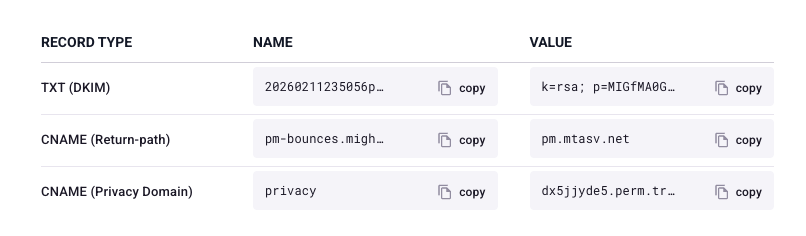
Setup Steps
- Sign in to your DNS provider and open DNS management for
yourcompany.com. - Go to the DNS records area (often labeled DNS Records, Zone Editor, or Domain Management).
- Add each record from the example above:
- Set Type to
TXTorCNAMEexactly as shown. - Set Name/Host exactly as shown (or use host-only format if your provider appends the domain automatically).
- Paste the full Value exactly from Account Settings > Domain.
- Set Type to
- If a TTL is required, use your provider default (or
1 hourif you need to choose one). - Save all DNS changes.
Wait for DNS propagation (this can take up to 72 hours in some environments).
Detailed Instructions for Popular Domain Registrars
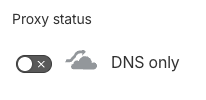
If you are using Cloudflare, make sure the records are set to DNS only (not Proxied).
Verification
After saving your DNS changes, go back to the TrueVault app at polaris.truevault.com and verify your records under Account Settings > Domain.
Troubleshooting
- If your DNS panel asks for a host only, use
@(or blank) for root-domain records and use subdomains only for other records. - If you already have an SPF TXT record for the root domain, update that existing SPF record instead of creating a duplicate SPF policy.
- A hostname with a CNAME record cannot also have other record types on the same hostname.
- If records do not resolve immediately, wait for DNS propagation and check again.